
Keep the source in view
Upload or select the image that should guide the edit without removing it from the project.
AI image editor
Keep the source, prompt, generated variations, and final layout together in one editable project.
10 free credits every UTC day. No card or subscription required.
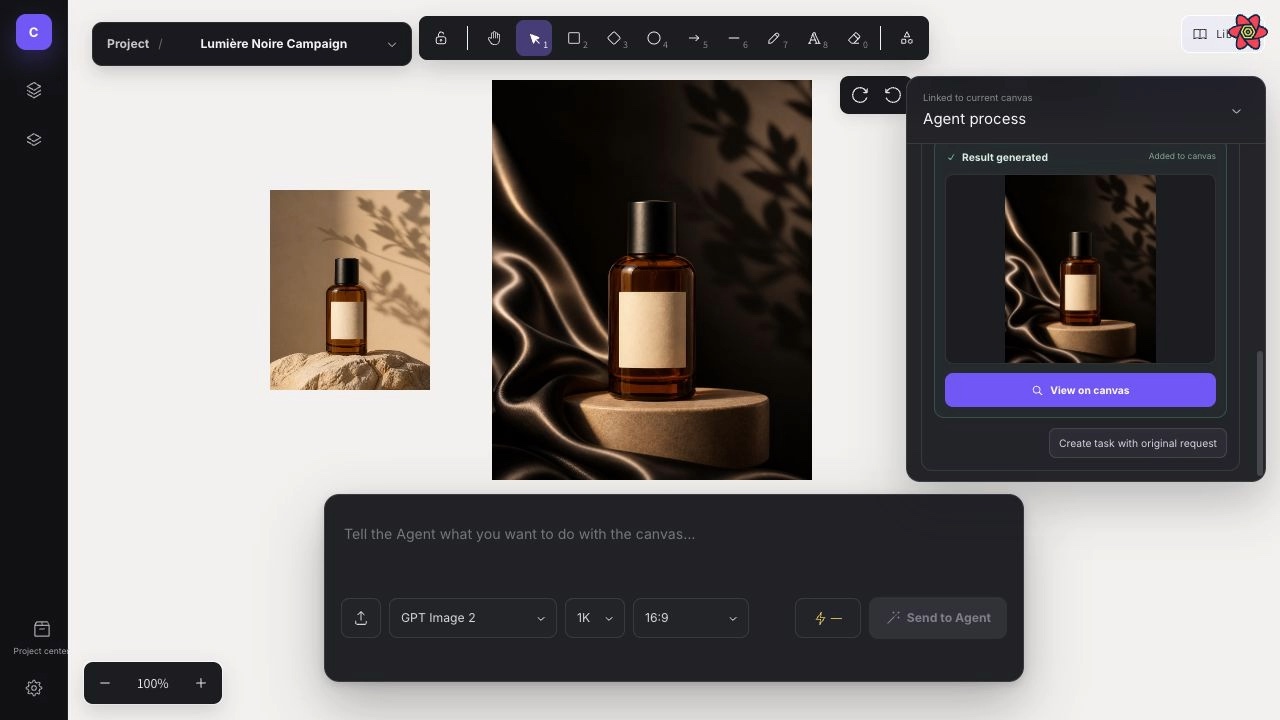
Real Studio workflow
The source image, Agent activity, generated result, and surrounding composition remain visible in the same project.
Starting prompt“Keep the product unchanged, replace the background with a warm editorial set, and leave clear space for a headline.”
Move through a focused edit without losing the reference, the generated result, or the layout you are building around it.
Upload or select the image that should guide the edit without removing it from the project.
Give the Agent a focused request and review the generation setup before credits are used.
Compare the result beside the source, then add text, shapes, frames, layers, or another variation.
Understand where CubbieAI fits between an image generator, a visual canvas, and a traditional pixel editor.
Not yet. CubbieAI focuses on AI-guided image generation, reference-led edits, visual composition, and project organization rather than a complete pixel-editing toolset.
Yes. Upload PNG, JPG, WebP, GIF, or SVG assets, place them on the canvas, and use supported images as visual references for AI edits.
Completed image results are saved to the project asset library and automatically placed on the current canvas when possible.
Yes. Projects support version history and safety snapshots, and you can also export a Studio project backup.
Sign in with Google and start with today’s free credits. No card required.
Open CubbieAI Studio